%%{init: {
"theme": "base",
"themeVariables": {
"fontFamily": "Lato, system-ui, sans-serif",
"background": "#f8f8f8",
"primaryColor": "#1a1a1a",
"primaryTextColor": "#f8f8f8",
"primaryBorderColor": "#1a1a1a",
"lineColor": "#2d2d2d",
"actorBkg": "#1a1a1a",
"actorBorder": "#1a1a1a",
"actorTextColor": "#f8f8f8",
"actorLineColor": "#2d2d2d",
"signalColor": "#2d2d2d",
"signalTextColor": "#2d2d2d",
"noteBkgColor": "#ffffff",
"noteTextColor": "#2d2d2d",
"noteBorderColor": "#4a6cf7",
"sequenceNumberColor": "#f8f8f8"
}
}}%%
sequenceDiagram
autonumber
participant N as Browser
participant S as R Server (Shiny)
Note over N,S: Persistent WebSocket
Note over S: Dedicated R session
N->>+S: input$bins = X
Note right of S: invalidates dependencies<br/>recomputes what's needed
S-->>-N: output$plot = <PNG>
Note over N: Shiny updates the element<br/>bound to output$plot
Hyperverse
Building the web from R, the way the web was designed.
Arthur Bréant
2026-06-17
Prologue
“What you’re doing with Shiny is not real web.”
My former boss
A few years later…
He wasn’t entirely wrong.
But not entirely right either.
The trigger
The release of {plumber2} on CRAN.
🔥 A modern HTTP server for R: routes, async, serialization, …
Building the web from R, the way the web was designed.
hyperverse
hyperverse
An R package ecosystem for building modern web applications, the web way.
🔥 Not a Shiny replacement, just another approach.
The stack at a glance
📦 htmxr → server interactivity via HTTP
📦 alpiner → pure client interactivity
📦 htmxr.bootstrap → styled components
📦 glitchtipr → error monitoring
Today, focus on htmxr: the central piece.
htmxr
The bridge between htmx (JS lib, HTML attributes) and plumber2 (R HTTP server).
🔥 You write R: htmxr generates HTML with the htmx attributes the browser can read.
The two mechanics
How Shiny communicates
🔥 The server keeps the pipe open.
How htmxr communicates
%%{init: {
"theme": "base",
"themeVariables": {
"fontFamily": "Lato, system-ui, sans-serif",
"background": "#f8f8f8",
"primaryColor": "#1a1a1a",
"primaryTextColor": "#f8f8f8",
"primaryBorderColor": "#1a1a1a",
"lineColor": "#2d2d2d",
"actorBkg": "#1a1a1a",
"actorBorder": "#1a1a1a",
"actorTextColor": "#f8f8f8",
"actorLineColor": "#2d2d2d",
"signalColor": "#2d2d2d",
"signalTextColor": "#2d2d2d",
"noteBkgColor": "#ffffff",
"noteTextColor": "#2d2d2d",
"noteBorderColor": "#4a6cf7",
"sequenceNumberColor": "#f8f8f8"
}
}}%%
sequenceDiagram
autonumber
participant N as Browser
participant S as R Server (plumber2 + htmxr)
N->>+S: GET /plot?bins=X
Note right of S: runs the route<br/>generates HTML
S-->>-N: <svg>...</svg>
Note over N: htmx swaps the SVG into #35;plot
🔥 The browser asks, R answers. No pipe, no R session.
One phrase to remember
In Shiny, the server reacts,
In htmxr, the browser asks.
The demo
Pretty fast, right? 😏
The benchmark
🔥 Same OVH VPS, same hardware, to make the comparison fair.
For reference, the Shiny app also runs on Posit Connect: 🔗 connect.thinkr.fr/hello-shiny (different infra, not benchmarked).
Initial load
Wait time before the plot is visible in the DOM.
htmxr
──────────────────────
🔥 0.3s
Shiny via Shinyproxy
─────────────────────
🔥 0.9s
Slider interaction
What happens when you move the slider, step by step.
htmxr
──────────────────────
🔥 Near-instant
GET /plot?bins=X- R generates an SVG in ~12 ms
- htmx swaps it in the DOM
→ Three steps, all standard.
Shiny via Shinyproxy
─────────────────────
🔥 Micro delay
- new value via WebSocket
- reactive graph invalidation
- recomputation
- PNG render, base64 encoding
- return via WS
- DOM update
→ Seven steps, several specific to Shiny.
Client weight
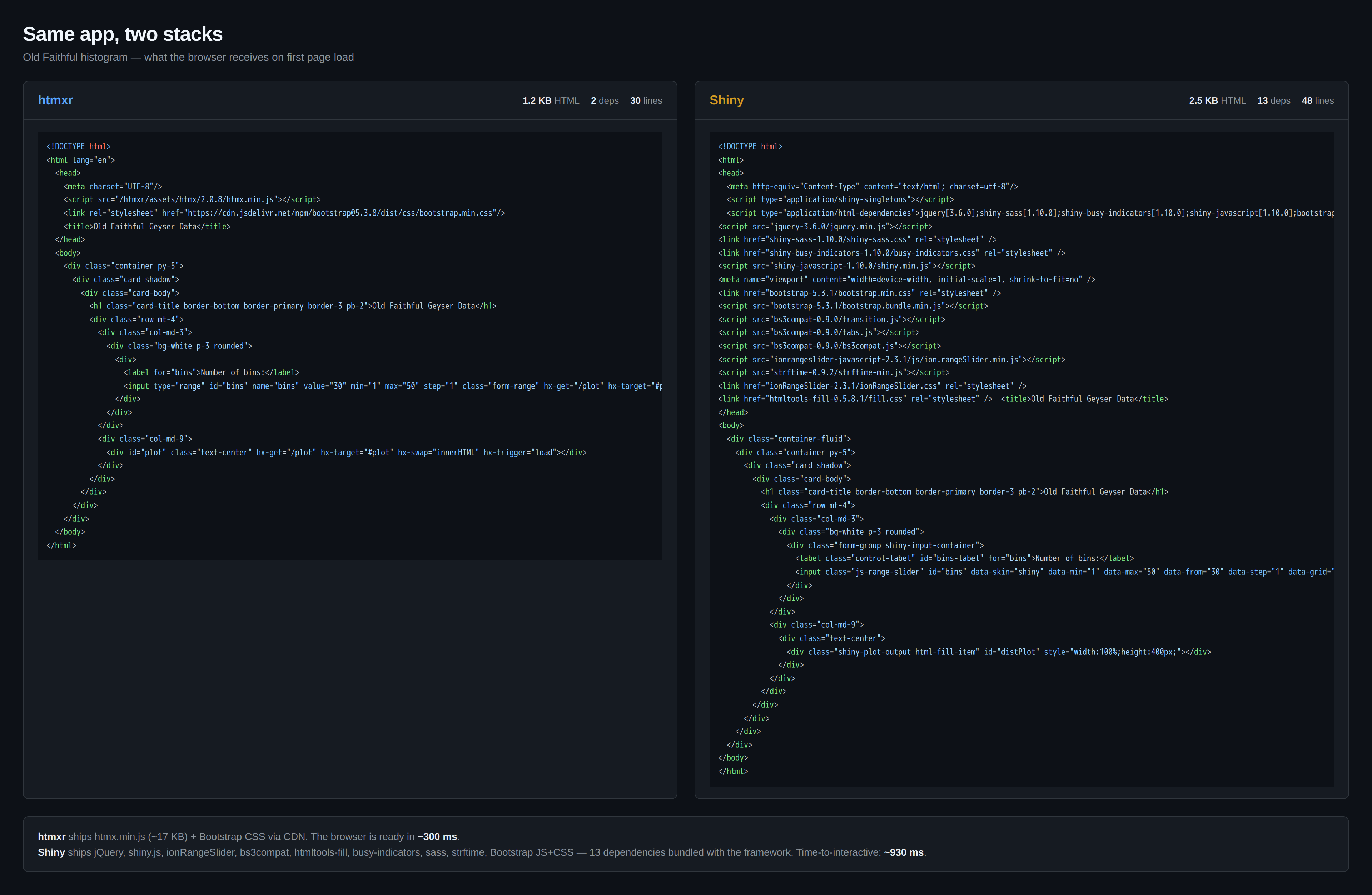
Why these differences?
→ JS/CSS deps: 2 vs 13
📦 htmxr: 30 lines of HTML, 2 deps (htmx.js + Bootstrap).
📦 Shiny: 48 lines, 13 deps (jQuery, shiny.js, ionRangeSlider, bs3compat, …).
fast and cheap, really? 🤔
#1 HTTP is stateless by design
htmxr (stateless HTTP) ──────────────────────
1 shared R process
RAM ♾️ active requests
Idle user = free
Shiny (stateful WS) ─────────────────────
1 R session per user
RAM ♾️ connected users
Idle user = costs
🔥 You pay for actual work, not idle sessions.
#2 The OVH bill
At equal hardware (VPS-1 OVH, €6.62 incl. VAT/month):
| Architecture | Capacity | |
|---|---|---|
htmxr |
1 shared process | 1000+ users |
Shiny via Shinyproxy |
1 container / user | ~20 users |
At equal load (500 active users):
| Infrastructure | Cost | |
|---|---|---|
htmxr |
VPS-1 OVH | €6.62 incl. VAT/month |
Shiny via Shinyproxy |
dedicated RISE-1 64 GB | ~€78 excl. VAT/month |
🔥 ~12× on the bill, for the same user load.
#3 Interoperability: one single API
🔗 hello.demo.hyperverse.world/plot?bins=20
→ This URL returns the SVG directly.
Browser, curl, Python, another R app, webhook. Any HTTP client.
The pattern: same data, two serializers.
🔥 Same backend, two clients.
❌ With Shiny, an app is only consumable by a browser running Shiny.
#4 What you inherit for free
✅ HTTP cache, CDN, replicas
✅ Horizontal scaling (statelessness mandates it)
✅ Standard monitoring (HTTP codes, nginx logs, metrics)
✅ Addressable URLs (share via email)
✅ Deployable anywhere (Docker, VPS, k8s, serverless)
✅ Debugging via the browser DevTools
🔥 The web experience.
On the code side
A slider
htmxr
💡 Mental mapping preserved: same “standard” parameters + 3 attributes to wire up the HTTP request.
The structure of an app
htmxr (api.R)
💡 Two route types: the full page and the HTML fragments.
What about reactiveValues?
htmxr
🍪 datastore$session
🌍 datastore$global
💡 No reactive blackboard: each concern in its proper place.
Not everything exists (yet)
🚧 htmxr.bootstrap still in dev (unstable Sass theming).
🚧 glitchtipr / alpiner not yet published on CRAN.
🚧 No massive prod feedback yet: to be battle-tested.
🔥 The ecosystem is young → open call for contributions.
Who is htmxr for?
htmxr shines for ✅
- Public apps with many users
- Apps with speed constraints (even internally)
- Tight budgets (~12× cheaper on infra)
- Reusable endpoints: web, mobile, other services
- R devs comfortable with HTTP, or curious about the web
Shiny remains the right choice for ✅
- Internal dashboards, small audience
- Apps that depend on DT, plotly, bslib…
- Fine-grained reactivity needed
- Stack in place, tight deadline
🔥 Two tools, not a duel.
hyperverse
📖 Docs → 🔗 hyperverse.world
🚀 Live demo → 🔗 hello.demo.hyperverse.world
💻 GitHub → 🔗 github.com/hyperverse-r
Thank you!
